DayzHUBConsole

Cloud console for DayZ servers

Run your DayZ server from the browser.

DayzHUB Console is a cloud console for the DayZ server you already have. One small server-side mod and your RCON login - no host change, nothing for players to download.

  • No host change
  • Nothing for players to download
  • 13 languages
Survival #1 · Chernarus Online
9 Players 21.6k Server FPS

Live events

    Demo data. Drag a player to teleport them, hover a player or click a marker on the map.
    • RCON loginPlayers, kick and ban, chat log and messages run over BattlEye RCON.
    • One small modThe server-side agent adds the live map and the server FPS.
    • Any devicePhone, tablet or desktop: it is all in the browser.
    • 13 languagesThe whole console, translated for your team.

    Quick start

    What you get in 5 minutes

    Connect your server in 5 minutes. Right after, this is what you see in your Console.

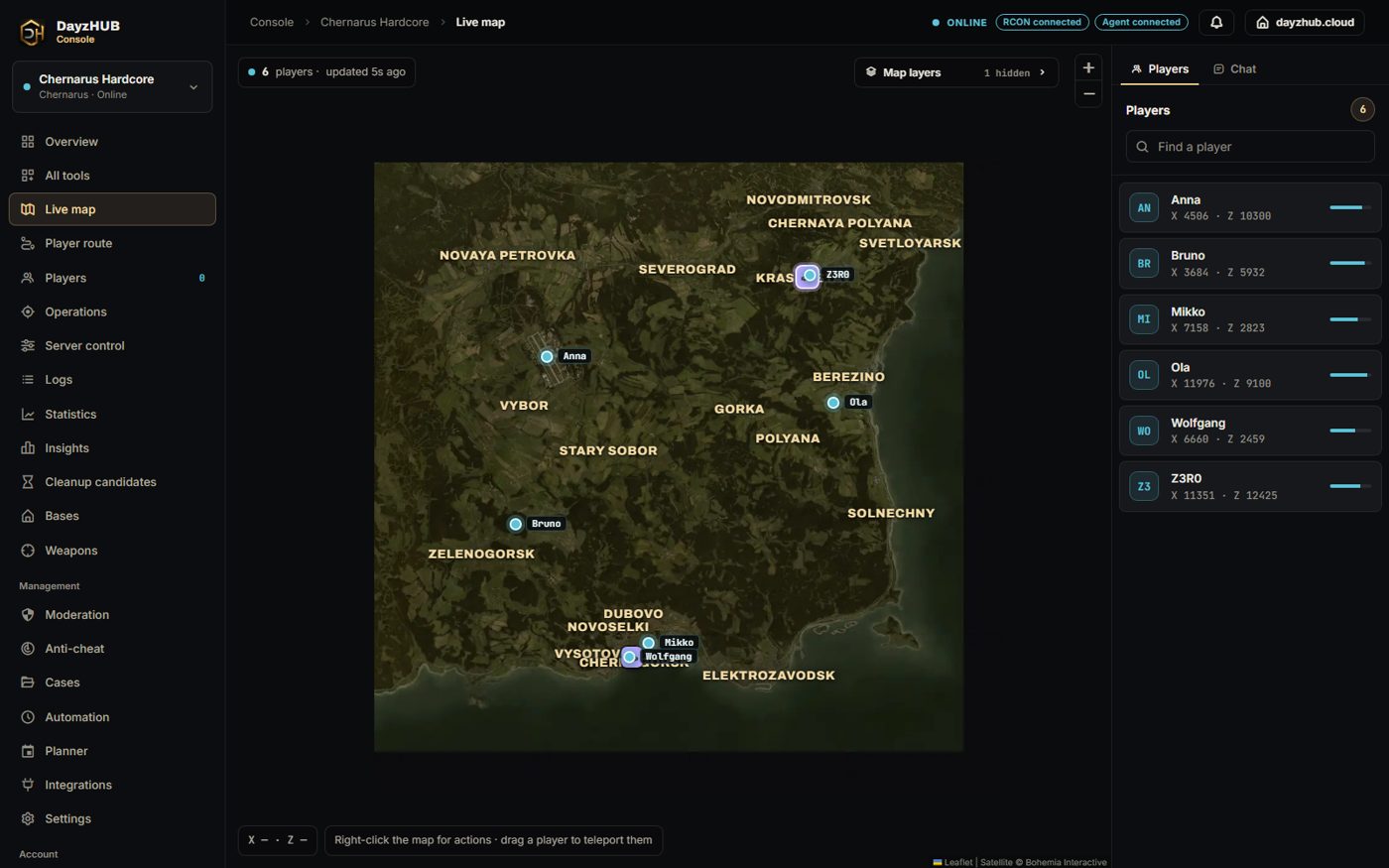
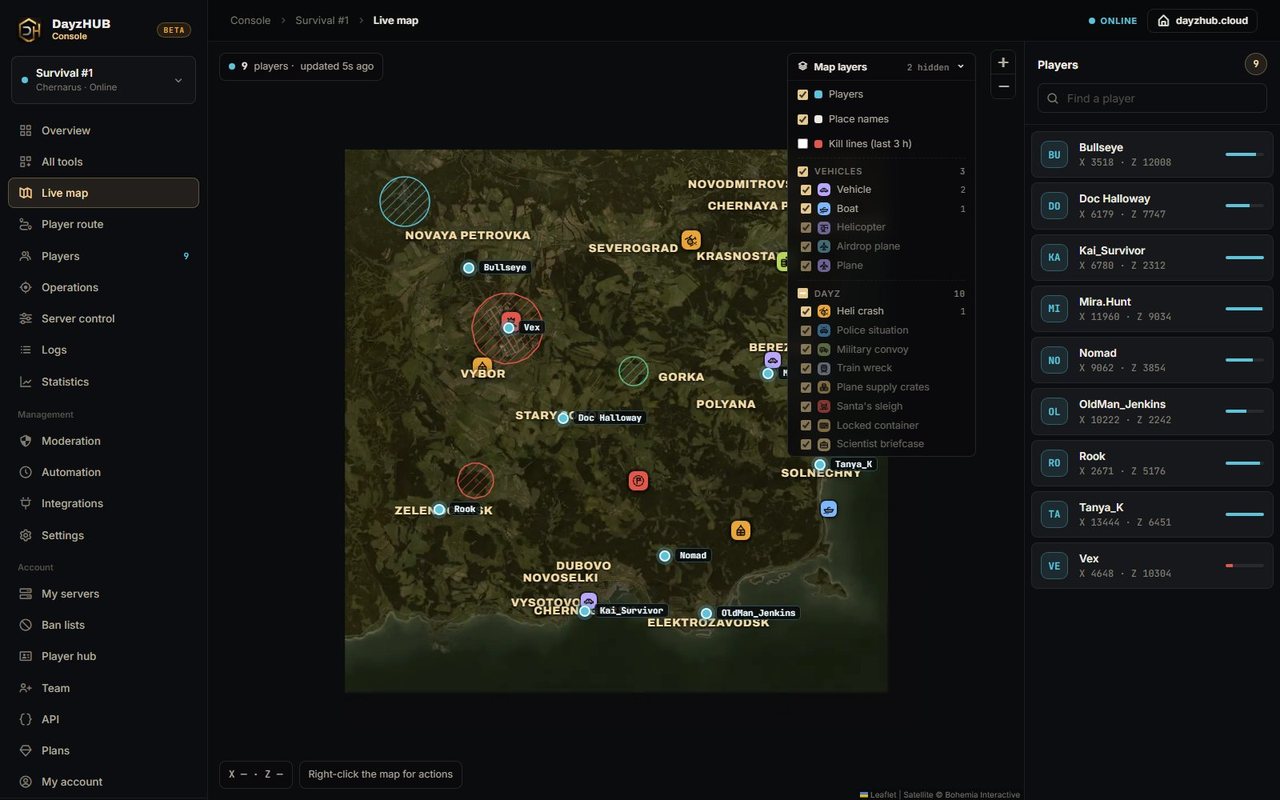
    DayzHUB Console live map with players on a Chernarus map and the player list

    Live map

    Your players on the map of your server, updating live.
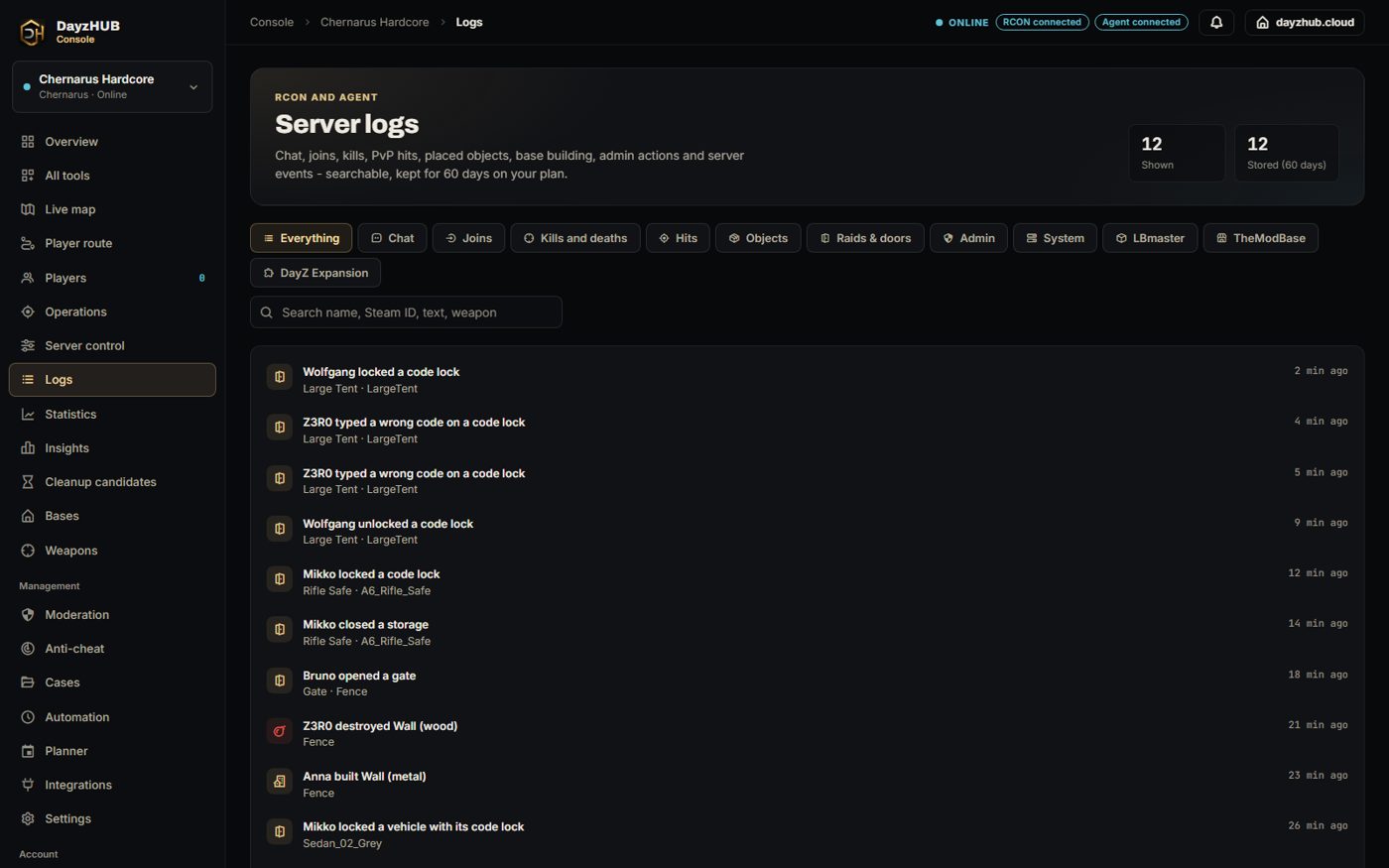
    DayzHUB Console raid log with code lock lines, wrong codes and doors

    Raid log From Pro

    Raids on your server's bases, listed in one place.
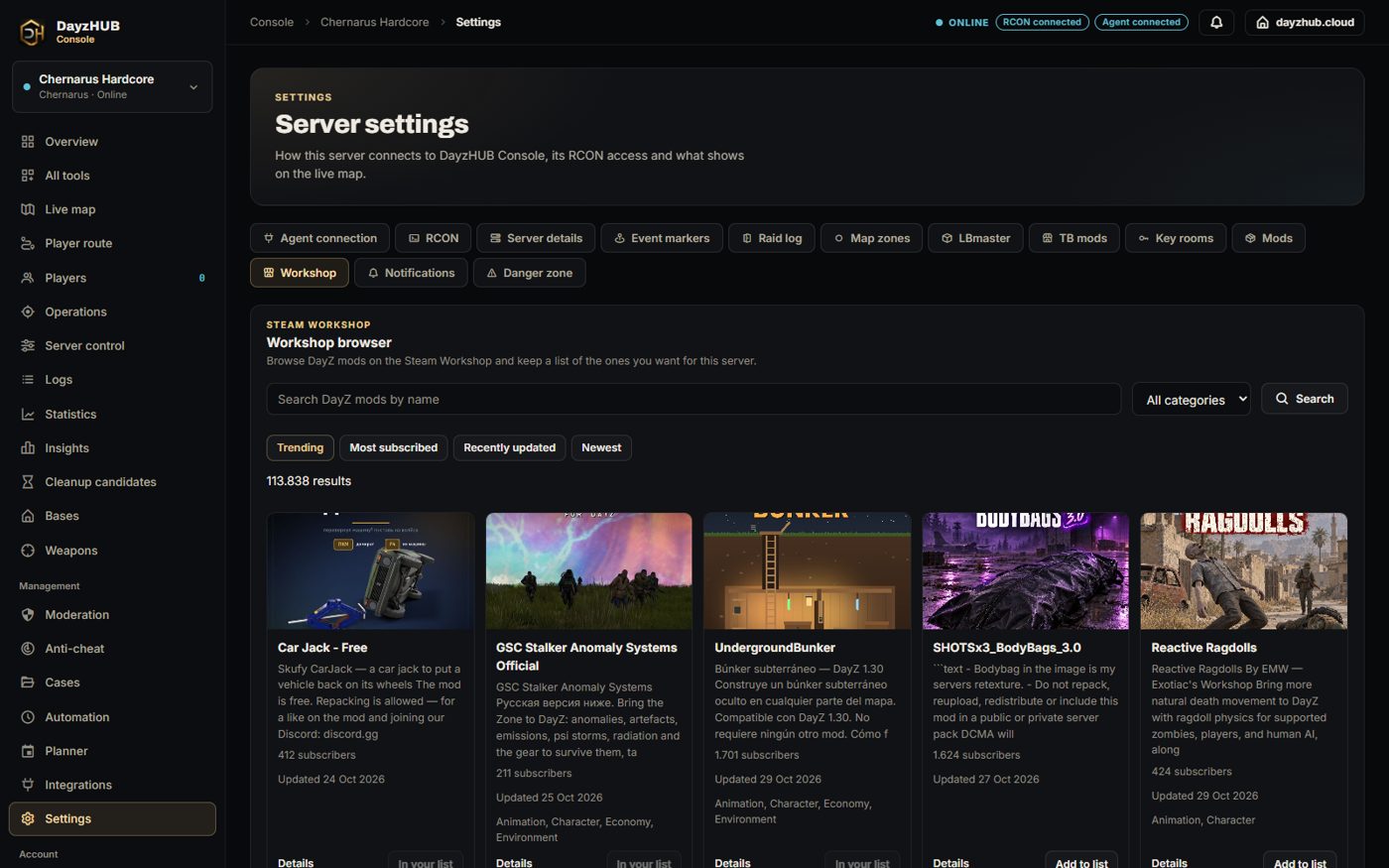
    DayzHUB Console Workshop browser with Steam Workshop mods and an Add to list button

    Workshop browser From Standard

    Browse the Steam Workshop from the Console and keep a list of the mods you want for your server.
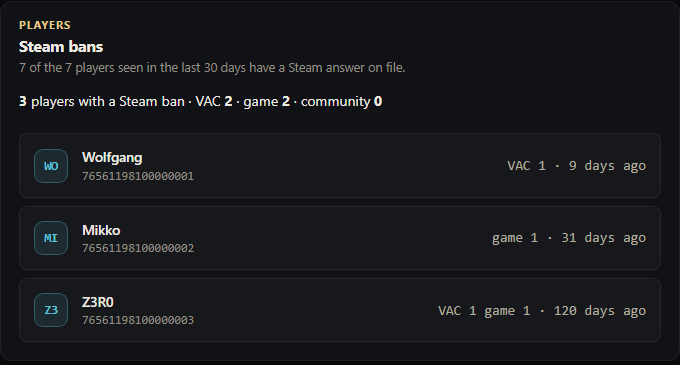
    DayzHUB Console Steam bans card listing players with a VAC or game ban

    Steam bans From Pro

    See which of your players have a VAC, game or community ban on their Steam account.

    Screenshots from the Console, shown with example players.

    Plans and prices

    • 14-day Pro trialNo card needed
    • Standard€5.99 / month
    • Pro€9.99 / month
    • Community€22.99 / month

    Features

    Everything you need to run a DayZ server

    Live map, players, moderation, automation and logs in one console, instead of spread across separate tools.

    Live map

    Players and vehicles on satellite tiles, with the events and zones of vanilla DayZ and DayZ Expansion. Chernarus, Livonia, Sakhal, Nasdara and 10 community maps, from Deer Isle to Namalsk.
    Live map

    Server performance

    Your server's health on one live chart, every 15 seconds: the server FPS, tick rate and longest frame, players online and in the login queue, AI and items in the world. Restarts and downtime are marked, and each line can be shown or hidden.

    15 min agoDemonow

    Admin actions

    Heal, teleport, give kits, spawn, weather and time - from any device. Admins can also explode a player, blow up a vehicle or remove all vehicles.

    Bans that follow players

    Bans, whitelist, chat and name filters on every plan. Ban appeals and shared ban lists from Standard; reserved slots and Steam checks with Pro.

    Automation

    Restarts at set times with warnings, timed messages, event triggers and Discord webhooks, from Standard. A chat bot with custom commands (4 on Standard, 40 on Pro), uptime restarts and your own embeds with Pro. A top players of the week post on Discord every Monday on Standard and up, with the top weapons on Pro. Mod update alerts tell you when a Workshop mod needs a server restart.

    Logs and statistics

    Join, chat and kill logs; population, performance and leaderboards. Hit, building and mod logs with Pro.

    Mod support Pro

    Markers, zones, logs and player data from LBmaster, TheModBase, HunterMods, BS Key Room, A6 Base Storage and A6 Hacking Tablet. Every mod we support next is part of Pro too.

    • LBmaster19 compatible
    • TheModBase13 compatible
    • HunterMods9 compatible

    Player route Pro

    Replay where anyone went: every stretch on foot or by vehicle, their events on the way, and every teleport explained. Jumps nobody can explain are flagged in red.

    • On foot
    • Vehicle
    • Unexplained jump

    See all 71 features

    Product tour

    See the console

    Real screens from DayzHUB Console.

    DayzHUB Console · Server overview

    Mod-aware

    It reads the mods your server already runs

    The agent picks up zones and events from popular mods on its own. Vanilla DayZ and DayZ Expansion come with Standard; LBmaster, TheModBase and the other mods with Pro.

    LBmaster mods and what the Console does with them 19 compatible From Pro

    We run a test server with these LBmaster mods and the Console together. Here is what the Console reads from each one and where you see it.

    • On the live map
    • Dashboard buttons
    • Logs and history
    • Player page and stats
    • Overview
    • Moderation
    • Through LBmaster's webhooks

    Core

    Compatible
    • First join, last online and sessions on the player page
    • Receives LBmaster's events through one webhook link
    • View LB's configs and reload them from the Console
    • LB suite health, the error feed and security alerts
    • Suite health: every installed LBmaster mod with its version, and any config LBmaster refused to load
    • Browse and read LBmaster's configs (webhook, API and admin files stay hidden) and reload one from disk without a restart
    • LBmaster's own error log, in the Console
    • The staff roster from LBmaster's admin file and an audit of its API routes (owner only)
    • Import every player LBmaster has ever seen into the player list, with first and last seen dates

    Advanced Groups

    Compatible
    • Group tags next to players on the map
    • No-build zones from the Groups config
    • Group name, tag and level on the player page
    • Every group with its members and ranks, in Players
    • Territory flags raised, lowered and expired
    • Global, group and direct chat in the chat log
    • Mute or unmute players in LB chat, and send a chat message
    • LB map markers for everyone or for one player, and remove them
    • Live group limits: members, map markers and plot poles
    • Territory audit: plot poles in no-build zones or too close together, and groups over their plot pole limit
    • A group's own map markers, on request
    • An LBmaster map marker on everyone's map, with text, colour and an automatic removal time
    • LBmaster chat mutes: see who is muted, mute for a set time, unmute

    Plot Pole DLC

    Compatible
    • Plot poles with owner and upkeep on the map
    • Plot pole history: built, claimed, lost

    Advanced Loot Chests

    Compatible
    • Loot chests on the map, open or closed
    • Open or respawn a chest from the map
    • Every chest spot from the config
    • Who opened which chest, with the key used

    Airdrops

    Compatible
    • Airdrop crates on the map, each kind in its own colour: military, medical, base building and more
    • Drop zones from the config
    • Each flight on the live map with a replay, and an Airdrops tab: countdowns, who called or opened a drop, despawn time, crate types in colour and switches for upcoming, in-the-air and landed drops
    • When the next drop is due, from LB's own schedule
    • Incoming drops with a countdown, flares and who looted

    Virtual Garage

    Compatible
    • Garages on the map
    • Stored vehicles on the player page
    • Stored, taken out, impounded and hacked vehicles
    • Impound a vehicle, waive the wait and fee, remove or free one, set a player's slots and level
    • Garage rules and bans, a census and a config check
    • Each player's garage with impound wait and fee: waive them, remove a vehicle, add extra slots or a garage level
    • Impound a vehicle from the live map into its owner's garage, with a wait and a fee
    • Garage signs with their fees and spawn point, and LBmaster's impound zones, on the live map
    • A census of every garage file, and a check of the garage, vehicle price and impound settings
    • Every garage change made from the Console in the logs, with before and after

    Enhanced Banking

    Compatible
    • ATMs on the map with cash and robbery state
    • Bank balance on the player page
    • Robberies, deposits, withdrawals and transfers
    • Add or take bank money, set a group's balance, paycheck boost and money drops
    • Spawn or despawn an ATM, set its cash pool, reset robbers, stop a robbery
    • Bank log, ledger, credit cards, the economy and bank checks
    • A bank card on each player page: balance, account limit and every change made from the Console
    • Add or take bank money, even while the player is offline
    • The paycheck at a glance, and a timed paycheck boost for everyone
    • Every ATM in one list, unspawned ones too: spawn or despawn them, set the cash pool, reset robbers and cooldowns
    • Banking overview: the money in bank accounts, group accounts, credit cards and ATMs, the richest accounts, and a credit card lookup by number

    Admin Tools

    Compatible
    • Every LB admin action in the admin log
    • Watchlisted players joining
    • Import teleports and item presets as templates
    • LB bans in Moderation, and the LB watchlist: add, edit and remove players (agent 0.8.9)

    Spawn System

    Compatible
    • Spawn signs and sleeping bags on the map
    • Spawn points from the config
    • Spawn point cooldowns and sleeping bags on the player page
    • Where each player spawned

    Utility Workbenches

    Compatible
    • Repair and ammo workbenches on the map, player-built and static

    Skin System

    Compatible
    • Repaint and swap workbenches on the map, player-built and static
    • Repaints in the object log

    Achievements

    Compatible
    • Achievements unlocked and the chosen title on the player page
    • Achievements earned

    AFK Kick

    Compatible
    • AFK kicks

    Killfeed

    Compatible
    • Kills are logged by the Console itself, alongside LB's killfeed
    • Current and best killstreak on the player page
    • Killstreak leaderboard in Statistics

    Quiz

    Compatible
    • Rules quiz passed or failed on the player page

    Enhanced Item Restrictions

    Compatible
    • Each flag's walls, tents and locks against their limits

    Raid Alert

    Compatible
    • Raid alert towers on the map: assembled, sender, battery and how long it lasts
    • Test a tower's alarm from the map
    • Raid alarms on the map and in the raid log
    • Set the alarm radius from the Console

    Better Codelock

    Compatible
    • Raids on Better Codelock locks in the raid log
    • Wrong codes and code resets on its locks in the raid log
    • Vehicle lock and unlock lines in the raid log

    Base Building

    Compatible
    • Base Building in the raid log: placements, builds and dismantles with the part name
    • Hits and destroyed parts, credited to the player who placed the explosive
    • Doors opened and closed

    Lines with the link icon come from LBmaster's own webhooks: paste one link in Settings. LBmaster names and logos belong to LBmaster.

    TB mods and what the Console does with them 13 compatible From Pro

    Our test server runs these TheModBase mods together with the Console. Here is what the Console reads from each one and where you see it.

    Dynamic Trader

    Compatible
    • Each trader where it stands now, with its next move, opening hours and goods
    • The trader's safe zone, moving with it
    • Every spot the trader moves between
    • Purchases and sales in the logs

    Car Dealer

    Compatible
    • Car dealers with the vehicles for sale and their prices
    • Vehicles bought and sold

    Second Hand Market

    Compatible
    • Market stalls with what is on offer
    • Player stalls: owner, open or closed, money inside, slots and lifetime
    • The market: every offer and order, with prices by item, and the purchase order limits, global and per stall type (TB Second Hand Market 1.33.2 or newer)
    • Each player's offers and orders at the global stalls, on their player page
    • Offers, orders and money at the stalls
    • Stall dealers, bulletin boards and the areas stalls may be built in

    Vehicle Lock System

    Compatible
    • Owner, lock, alarm, key holders and extensions on vehicle popups
    • The vehicles each player owns or holds keys to, on their player page
    • Unlock a locked vehicle from its live-map popup
    • Stop the alarm, fix the short circuit, change the owner and remove the owner (Vehicle Lock System 1.4.0+) from the live-map popup
    • Ownership, keys, packing and admin changes
    • Every packed vehicle and who carries it

    Death Insurance

    Compatible
    • Insurance machines
    • Each player's insurance and heirs on their player page - the last saved ones while offline. The plan currency on the rules card (TB Death Insurance 3.18.1 or newer)
    • Insurance bought, deaths with insurance, items collected

    Real Estate

    Compatible
    • Owned houses on the map
    • The houses each player owns or holds keys to, on their player page
    • Houses bought and sold

    Revive Player

    Compatible
    • Hospitals where players are revived
    • Revives, with where they happened
    • Revive a dead or downed player from the live map (TB Revive Player 3.17 or newer)

    Daily Reward

    Compatible
    • Each player's playtime, distance, kills and rewards on their player page - the last saved ones while offline
    • Daily rewards claimed and admin edits

    War Party

    Compatible
    • Lobby entrances with arenas and match options
    • Each player's War Party points, kills, deaths and wins on their player page - the last saved ones while offline
    • Matches created, started and ended

    Jewels of Survival

    Compatible
    • Anvils, grinders and smelters
    • Ore rocks and ore spawn areas

    Basic Needs

    Compatible
    • Washing machines and dryers

    Carry

    Compatible
    • Players who are being carried are marked on the live map, and packed bodies show with a body bag icon and who carries them

    Premium (TBLib)

    Compatible
    • Premium per mod on the player page
    • Give premium from the player page
    • Premium coins used and premium added
    • Remove premium days from a player
    • Send a message in TB's popup, or show a player a screen marker
    • See the TB admins and set a player's admin rights
    • Fill TB's logger files with the logs link in one click

    Lines with the link icon come from TB's own logger: paste one link from Settings, or let the agent fill TB's logger files for you. TB mod names and logos belong to TheModBase.

    DayZ Expansion modules and what the Console does with them 11 compatible From Standard

    Our test server runs the DayZ Expansion Bundle with the Console. Here is what the Console reads from each module and where you see it.

    Bundle

    Compatible
    • Chat from every Expansion channel in Logs, with the chat filter and !commands
    • P2P market traders on the map
    • Vehicles stored in and taken out of the virtual garage, in Logs
    • The vehicles each player has stored, on their player page
    • Each player's reputation on their player page while they are online

    Core

    Compatible
    • Safe zones from the Expansion config
    • Players entering and leaving safe zones, in Logs

    Market

    Compatible
    • Traders on the map with their name
    • ATMs on the map
    • Trader zones on the map with their name and radius
    • Every purchase, sale and ATM transaction, in Logs
    • Each player's ATM balance on their player page, and money into it for admins

    Vehicles

    Compatible
    • Helicopters, boats, planes and bikes on the live map, each with its own icon
    • Key, lock and owner in each vehicle's details
    • Repair, refuel, stop or remove Expansion vehicles
    • Unlock a vehicle, or reset its keys when a player lost theirs
    • Keys paired, lock-picking, towing and destroyed vehicles, in Logs
    • Who got in, started the engine and got out of each vehicle, and parts taken off, in Logs

    Base Building

    Compatible
    • Territory flags with the territory's name, level, members and radius
    • No-build zones from the base building settings on the map
    • Territories created, members invited and removed, raids on bases, in Logs
    • The territories each player owns or belongs to, on their player page

    Groups

    Compatible
    • Each player's group tag and name on the live map
    • Groups created, invites, members joining and leaving, in Logs
    • Each player's party on their player page, and every party with its members on the Players page

    Quests

    Compatible
    • Quest givers and quest boards on the map with their name
    • The quests each quest giver and board hands out, in its details
    • Quests started, completed and cancelled, with the quest name, in Logs
    • Each player's active and completed quests, on their player page

    Missions

    Compatible
    • Expansion airdrop crates on the map, each kind in its own colour
    • Each airdrop's kind, the place it was sent to and the items left inside
    • The airdrop plane flying on the map
    • Trace route on the airdrop plane: where it came in and the point it drops at
    • Every airdrop Expansion sends and where it is heading, in Logs

    AI

    Compatible
    • Deaths by AI in the kill logs, with the bot's name
    • Remove every AI on the map from Operations

    Navigation

    Compatible
    • The server's own map markers on the live map

    Spawn Selection

    Compatible
    • The spawn selection's spawn points on the map
    • Where each player chose to spawn, in Logs

    Chat, Garage and P2P Market come only with the Bundle, so they sit on its card. DayZ Expansion names and images belong to the DayZ Expansion team.

    HunterMods events and what the Console does with them 9 compatible From Pro

    Every HunterMods event mod the Console works with. Here is what you see on the live map for each one.

    Air Drop Plus

    Compatible
    • Airdrop crates on the map, with the items left

    Car Drop

    Compatible
    • Car drops on the map

    King of the Hill

    Compatible
    • King of the Hill zones: place, tier, capture progress and players in the zone
    • Reward crates: place, tier and items left

    Bunker Event

    Compatible
    • Bunker entrances on the map

    Camper Event

    Compatible
    • Camper events, with the infected nearby

    Ambulance Event

    Compatible
    • Ambulance events, with the infected nearby

    Toxic Event

    Compatible
    • Toxic events, with the infected nearby

    Locked Armory

    Compatible
    • Locked armories on the map

    Loot Containers

    Compatible
    • Loot containers on the map, with the items left

    HunterMods names and images belong to HunterMods.

    DayzHUB mods 7 compatible From Pro

    Our own mods, shown in the Console once the Console agent runs on your server.

    Terminal

    Compatible
    • A marker on the live map for every placed terminal
    • Stored, taken and upgraded lines in the logs
    • Terminal status, the quarantine list and a read-only look at a player's saved storage, as buttons

    Killfeed

    Compatible
    • Counted player-vs-player kills and streaks in the logs
    • Status and reload config buttons
    • Donor list: add, remove, list

    Leaderboard

    Compatible
    • A line when a new number one appears on a board
    • Status, recalculate and reload config
    • Donor badge list: add, remove, list

    Skin System

    Compatible
    • Every skin change and refused claim in the logs
    • The Skin System settings card
    • Premium per player, permanent or for days

    Recycler

    Compatible
    • Every recycler machine on the live map with its queue and tray (needs agent 0.18.0)
    • Runs, collects and refused items in the logs, plus machine alerts for low battery, a tray full for too long and a machine left running (the alerts need agent 0.14.0 or newer)
    • Status, settings, blacklist and recipes as buttons: show, add, change, switch off and remove recipes

    Inventory Manager

    Compatible
    • Grab-all, deleted items and refused requests in the logs
    • Buttons: status, re-read settings, Grab all on or off, change a setting, and a player's item locks (read only)

    Interface

    Compatible
    • Buttons: status, set the server HUD colour, lock or unlock one colour for every player, re-read config

    BS Key Room and A6 3 compatible From Pro

    Key rooms and their crates on the map, A6 base storage and tablet hacks in the raid log.

    BS Key Room

    Compatible
    • Key rooms and crates on the map
    • Open a room for a time, close and relock it, restock its crates
    • Who opened which room, and with which keycard
    • Room setup, loot odds and a keycard census

    A6 Base Storage

    Compatible
    • Base storage opened and closed in the raid log
    • Kits placed in the statistics, and the A6 settings as read-only cards

    A6 Hacking Tablet

    Compatible
    • Code locks hacked with the tablet, in the raid log
    • With the raid mode and the tablet and battery health

    BS Key Room and A6 belong to their authors. DayzHUB Console is not affiliated with them.

    More mods

    Vanilla DayZ From Standard

    Heli crashes and territory flags from the base game.

    The DayzHUB mods page of a server in the Console, with the Terminal and Killfeed cards (sample data)

    DayzHUB mods in the Console From Pro

    One page per server with a card for each installed DayzHUB mod: Detected or Not detected, the events of the last 7 days and the latest 15 lines.

    Each card has the mod's buttons. Dangerous ones ask for confirmation. Donor and premium lists are managed from the same page.

    The Console link is on by default in each mod when the Console agent is installed (Skin System's Console features need agent 0.11.0 or newer). The page needs Pro; the alerts need Standard.

    Getting started

    Up and running in three steps

    1. 1

      Connect your server

      Add your server with its RCON login. Your host and your mods stay as they are.

    2. 2

      Add the agent mod

      Install the small DHUBconsole server-side mod for the live map and the server FPS. Players download nothing.

      Get it on the Steam Workshop
    3. 3

      Run it from anywhere

      Players, map, logs and automation in any browser. Give your staff their own access.

    Live now

    Servers running DayzHUB Console

    1 server online28 players

    1. #1

      Aurora S5 Vanilla+ chernarusplus map YY:21513|S5|

      CNChina 1PP 7 mods

      Chernarus14:12 in game
      28/90 +1
      Peak 40

    See all servers

    Plans

    One console, three plans

    Billed monthly or yearly. Every plan includes everything in the plan before it.

    14-day Pro trial

    Try everything in Pro for 14 days. No card needed: link Discord, e-mail and Steam to start.

    14 daysNo card needed

    Open the console

    Standard

    The full console for up to two servers.

    €5.99 / month

    or €71.88 billed yearly

    • 2 servers
    • 30 days of logs
    • BattlEye RCON: kick, ban, broadcast, lock, restart
    • Online player list
    • Server ban list with temporary bans
    • Join, leave and chat logs
    • DHUBconsole agent mod: the server FPS, tick rate and longest frame, AI and login-queue counts, server location, mod load and the start-up time of every restart
    • Live map with players and vehicles on satellite tiles, and who is inside each vehicle, and a Chat tab to read and answer the in-game chat
    • Your own zones and DayZ Expansion's safe, trader and no-build zones on the map
    • Event markers for vanilla DayZ and DayZ Expansion: heli crashes, police, convoys, trains, contaminated areas, flags with their radius, airdrops, and on Badlands: broadcast bunkers, the sandstorm, water trucks and burning oil pits
    • Admin actions: teleport (with an optional height), a complete heal, spawn, kits, weather with a live readout, time, clearing a base at a territory flag, explode a player, blow up a vehicle and remove all vehicles; also firearms with magazine, rounds and a chambered round, a repair that puts back missing parts, and starting or stopping the Badlands sandstorm
    • Saved teleports (with an optional height), kits with condition and fill, and messages
    • DayZ Expansion data on player pages: ATM balance, party, territories, quests, garage and reputation
    • Kill and death logs with weapon, distance, how long the victim lived and the real cause of death: suicide, drowning, sickness, toxic gas, cold, roadkills, combat logs and AI kills, plus a speed hack warning
    • DayZ Expansion logs: market, ATMs, territories, parties, vehicle keys, garages, raids, safe zones, quests and airdrops, plus the Expansion Market page
    • Scheduled restarts at set times, with in-game warnings
    • Planner: restarts planned for a chosen date and time, with announcements days ahead
    • Automated join and timed messages
    • Discord webhooks with DayzHUB's ready-made embed, and a top players of the week post every Monday
    • Daily owner briefing: a short summary of the last 24 hours of each of your servers, by e-mail and/or to your Discord webhook, at the time you choose
    • Full player history with each player's stats, population and performance history, leaderboards: kills, accuracy on every target, AI kills and the longest life
    • Insights: new and returning players, peak hours, population and performance trend, session lengths, top weapons and killers, causes of death
    • Automation packs: ready-made sets of triggers, schedules, messages and chat commands installed in one click, and pack files to export and import
    • Player reports from the game (Esc menu, hotkey, or the death screen after a player kill), in Moderation › Reports, plus Cases
    • Event triggers: when a player joins, chats, kills, is kicked, gets a speed warning or is reported, send a message, kick, teleport, give a kit or lock the server
    • Chat bot with custom !commands (Standard: 4 commands)
    • Chat filter with warn, kick or ban
    • Player name filter
    • Whitelist
    • Editable system messages per language: refusals, kicks, bans and restart texts with reason codes
    • Shared ban lists across servers and communities (Standard: 1 shared list)
    • Public ban appeal form and inbox
    • Reusable whitelist, priority, chat filter and name filter lists shared by several servers
    • Switch-over importer: bring ban lists, whitelists, priority lists and filter terms from your previous tool (CFTools) or BattlEye files, with a preview and one-click undo
    • Ban a BattlEye GUID without a Steam ID, also written to the server through BattlEye
    • Staff access with viewer, moderator and admin roles, and the team audit trail (Standard: 2 staff members)
    • Session history on player pages: every visit with its length, per server
    • Public server page with a status badge, a status widget and the server rating
    • Embeddable top-players widget on the public server page. Shareable player profile: a public link to one player's stats, which you can revoke at any time
    • REST API: read-only tokens (one on Standard, five on Pro, unlimited on Community)
    • Notification centre: Discord channel (in the Console and by e-mail with every plan)
    • Mod update alerts: be told when a Steam Workshop mod on your server has been updated and the server needs a restart; also when Skin System refuses a claim and when a new number one appears on a leaderboard. Workshop browser: browse the Steam Workshop in Settings and keep a mod list for each server
    • Server FPS alert: be told (bell, e-mail, Discord) when your server drops under a floor you choose, and again when it recovers
    • DayZ Hub Discord bot link (the Discord server needs Premium 3): vote rewards claimed in game with !claim, ban, unban, kick and announce from Discord, plus live status and kill and join feeds from your server
    • Ticket inbox in the Console: a reply within 24 hours on Community, 48 hours on Standard and Pro
    Choose Standard
    Most popular

    Pro

    Moderation and automation for a growing community.

    €9.99 / month

    or €119.88 billed yearly

    • 5 servers
    • 60 days of logs
    • Everything in Standard, plus:
    • Gear at death: see it, restore it once or save it as a kit; see what an online player carries
    • Mod data and tools on player pages: LBmaster bank, groups, streaks and bans, garages, TheModBase premium, War Party, Daily Reward and insurance, DayzHUB Skin System premium (give or remove), TB tools (Revive from the live map with TB Revive Player 3.17 or newer, change a vehicle's owner), plus the Second Hand Market overview; also the DayzHUB mods page (a card per DayzHUB mod with events, lines, buttons and donor lists) and a DayzHUB mods activity panel on player pages
    • Insights: retention cohorts (day 1, 7, 30), churn list and kill and death heat maps on the map
    • Insights: CSV export of every table
    • Mod event markers: LBmaster, TheModBase (including TB Carry bodies), HunterMods, BS Key Room and more
    • LBmaster airdrop flights: each route live with a replay, countdowns, who called or opened a drop, crate types in colour
    • No-build and safe zones from LBmaster, TheModBase and more
    • Player routes: replay where anyone went, with vehicle legs, events on the path and teleport checks
    • Hit logs with body zone and damage, plus weapon statistics, the impact map and top weapons in the weekly Discord post, and the fire-rate check (a weapon fired faster than it can), and the Anti-cheat review
    • Placement, build, dismantle and raid logs - flags, tents, shelters, barbed wire, repairs and folding - with A6 Base Storage, A6 Hacking Tablet and BS Key Room, plus who built each base part and who took items from another player; Badlands rebuildable houses (built, cleared, destroyed, raided); items dropped, stored and taken with the item's own id; and the Stats cards for storage, economy, duplicated items and network traffic, and the Bases page
    • Mod logs from LBmaster and TheModBase: raids, airdrops, ATMs, garages, trades, stalls, War Party matches and more
    • Restarts after a set server uptime, with in-game warnings
    • Your own Discord embed templates for webhooks
    • Trigger conditions (also how often it happened), a takes items event, Discord post, command and LB watchlist actions
    • Reserved slots and priority players (Standard: with the Store add-on)
    • Steam checks: VAC bans, account age, private profiles
    • Ping limiter: warn, then remove players whose ping stays too high
    • IP bans (an exact address goes into the BattlEye ban list; a range like 1.2.3.* is enforced by the Console and needs RCON), and a same-network match in Potential alternative accounts (owner opt-in per server; addresses are never stored in the clear)
    • List a shared ban list in the public directory, with followers and a report form
    • Let installed mods request a kick or ban through the API, with rate limits, staff protection and an audit trail
    • Privacy mode: staff below admin see Steam IDs masked, and no IP data or Steam profile links
    • Player risk label (low, watch, high) from Steam facts and PvP signals, with the reasons, a Worth a look list for staff, and your own trusted or risky call
    • Potential alternative accounts on player pages: compared by names, join times and ban timing
    • REST API write tokens: edit whitelist and priority lists, kick, message and ban
    • Signed webhooks: joins, leaves, kills, bans, server status, reports and alerts as signed JSON with retries and a delivery log
    • LBmaster tools: bank and ATMs, garages, groups and territory, the LB suite
    Choose Pro

    Community

    Every feature across a whole server network.

    €22.99 / month

    or €275.88 billed yearly

    • Unlimited servers (fair use)
    • 90 days of logs
    • Everything in Pro, plus:
    • Custom staff roles: name a role and pick exactly which actions it may run
    • Player hub: one profile across all your servers
    • REST API player lookup and leaderboard endpoints, with higher rate limits
    Choose Community

    Standard, Pro and Community are open. Choose a plan to continue in your Console.

    Console Store add-on: €10.00 a month per server on Standard, Pro and Community (not during a trial). Players buy perks on your server's own store page and pay you directly; DayzHUB takes no cut. Console Store

    Every plan includes support by ticket and in Discord ([email protected] or the Discord support panel). Replies come within 24 hours on Community and within 48 hours on Standard and Pro.

    Compare every feature

    Reviews

    What users say

    5.0 out of 5 · 1 review

    • Genuinely never had support like this! I have have developed lots of different kinds of servers FiveM, RedM, Conan etc etc But DayZ Hub is on top!! Impressive work!

      ꂵ4ꉓꀘ꓄3ꈤ

    Read all reviews

    FAQ

    Questions server owners ask

    What is DayzHUB Console?

    A cloud console for the DayZ server you already run. You manage players, bans, logs, automation and a live map from the browser, on any device.

    Do I have to change my host?

    No. The console connects to your existing server. It works with any host that gives you RCON access and lets you install a server-side mod. PC DayZ servers only: PlayStation and Xbox servers have no BattlEye RCON and cannot load our server mod.

    Do my players need to download anything?

    No. By default the agent is a server-side mod and players join exactly as before. Only if you load it with -mod for in-game player reports do players download it.

    What does the agent mod add?

    Plain RCON covers kicks, bans, messages and the player list. The agent adds the live map, the server FPS, tick rate and longest frame, admin actions such as heal and teleport, event markers and detailed logs.

    Can my staff use it without the RCON password?

    Yes. From Standard, invite staff as viewer, moderator or admin: 2 people on Standard, 10 on Pro and 25 on Community. They sign in with their own Steam, Discord or email account and never see your RCON password, and every action they take is logged with their name.

    Which mods does it understand?

    With Standard: vanilla DayZ and DayZ Expansion - their events, airdrops and zones, plus Expansion's logs and player data. With Pro also LBmaster, TheModBase, HunterMods, BS Key Room, A6 Base Storage and A6 Hacking Tablet - markers, zones, logs and player data - and every mod we add next.

    Does it work with Discord?

    Yes. Every plan from Standard has Discord webhooks with DayzHUB's ready-made embed (3 on Standard, 10 on Pro, 25 on Community); with Pro you design your own embed templates. It is made by the team behind the DayZ Hub Discord bot. From Standard the Console can also post the week's top players every Monday, and with Pro the top weapons.

    Is there an API?

    Yes. Standard has 1 read-only key. Pro has up to 5 keys that can also write, plus signed webhooks. Community has unlimited keys with player lookup and leaderboards.

    Can I sign up now?

    Yes. DayzHUB Console is open to everyone: create an account and start with a 14-day Pro trial, then choose Standard, Pro or Community in your Console. During the 14-day Pro trial we e-mail you 3 days before it ends, on the last day, and when it has ended, with what you used (only to a confirmed e-mail address; you can switch these e-mails off with the link in them).

    See all questions

    Your server, one tab away.

    DayzHUB Console is open to everyone: sign up and start with a 14-day Pro trial, no card needed, or choose a paid plan in your Console.

    Open the console

    DayzHUB Console

    Cookie settings

    Choose whether DayzHUB Console may count your visits with our cookieless analytics. You can change this at any time.

    We count page views without cookies and without storing IP addresses or any other data that could identify you.

    Necessary cookiesNeeded for sign-in, security, your language and this choice.
    Always active
    Analytics — PlausibleCounts page visits without cookies or personal data, so we can improve DayzHUB Console.